What Would We Recommend for a Similar Upgrade in 2026?
Motherboard technology has moved forward considerably since this repair.
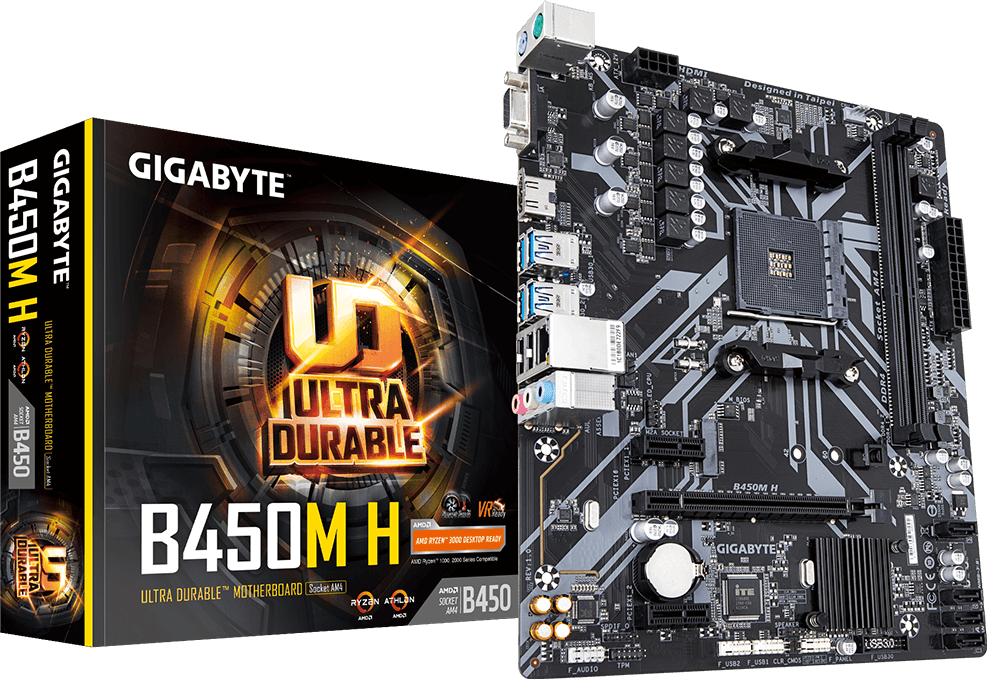
The original MSI B350M and Gigabyte B450M H use AMD’s older AM4 platform. Those motherboards can still be useful when repairing an existing compatible system, but they wouldn’t usually be our first choice for a new high-performance gaming PC built today.
For a modern build, we’d look at the customer’s current processor, graphics card, budget and planned upgrades before choosing the replacement motherboard.
Modern AMD Gaming PC Motherboards
For an AMD Ryzen 9000-series desktop gaming PC, examples of current motherboard options include:
Gigabyte B850 AORUS ELITE-P ICE
A modern AM5 motherboard option for gamers who want DDR5 memory and a platform with room for upgrades.
Gigabyte X870 AORUS INFINITY
A higher-end AM5 option for enthusiasts seeking modern connectivity, performance features and flexibility.
Gigabyte X870E AORUS MASTER X3D ICE
An enthusiast-class motherboard aimed at powerful AMD gaming builds, including systems using Ryzen X3D processors.
For customers staying with MSI, alternatives include the MAG X870E TOMAHAWK MAX WIFI and MPG X870E CARBON MAX WIFI.
These are examples of current products rather than universal replacements. The correct board depends on the processor, memory, case, cooling and features required.
Modern Intel Gaming PC Motherboards
For customers building around a compatible Intel Core Ultra desktop processor using Socket LGA1851, examples include:
Gigabyte Z890 AORUS ELITE WIFI7 PLUS
An enthusiast-oriented Intel motherboard with modern connectivity.
Gigabyte Z890 EAGLE PLUS
An alternative for a compatible Intel build where the customer wants the Z890 platform without necessarily choosing a flagship board.
MSI MAG Z890 TOMAHAWK WIFI
Another option for Intel users who prefer to remain with MSI.
Intel and AMD motherboards are not interchangeable. Choosing the correct processor socket is essential.
Can You Replace an Older MSI B350M with a Modern Gigabyte X870E or B850 Motherboard?
Yes, you can move from an older MSI-based system to a modern Gigabyte platform, but it isn’t necessarily a direct motherboard swap.
For example, an MSI B350M motherboard uses AMD’s AM4 socket and DDR4 memory.
Modern Gigabyte B850 and X870E motherboards use AMD’s AM5 socket and DDR5 memory.
That means the original Ryzen 5 1600 processor and DDR4 memory from our customer’s repair would not work in those newer motherboards.
A modern AM5 upgrade would require a compatible AM5 processor and DDR5 RAM, along with checks for cooler compatibility, power requirements and the existing PC case.
This is why we always assess the complete system rather than simply choosing a motherboard based on its model number.
Five Things to Check Before Replacing a Gaming PC Motherboard
1. Processor Compatibility
The motherboard must support the exact processor model, not just the manufacturer.
An AMD Ryzen processor cannot be installed in an Intel motherboard, and even processors from the same manufacturer may require different sockets.
2. DDR4 or DDR5 Memory
Moving from an older motherboard to a newer platform may also require new memory.
DDR4 and DDR5 are physically different and cannot be used interchangeably.
3. Case Size and Motherboard Layout
Not every motherboard fits every PC case.
ATX, Micro-ATX and Mini-ITX boards have different dimensions. Internal clearance, mounting points and component placement all matter.
4. Power Supply and Connections
A replacement motherboard needs the correct power connections.
It’s also important to check whether the existing power supply is suitable for the processor and graphics card, particularly in a high-performance gaming system.
5. Cooling and BIOS Compatibility
The existing CPU cooler may require different mounting hardware. You should also confirm BIOS support for the intended processor before installation.
Taking the time to check these details can prevent expensive mistakes.
Why Proper Diagnosis Matters More Than Replacing Parts
The most useful lesson from this Barnes pc repair is that a computer failing to start doesn’t always mean every major component has failed.
In this case, the customer was worried that the processor, motherboard and possibly the power supply were all damaged.
After testing, we established that the original processor and several other components could still be used.
That allowed us to concentrate on replacing the faulty hardware.
It’s the approach we continue to take at Geeks Callout London: diagnose the problem first, identify what can be reused and give the customer practical options.
Need Help Upgrading or Repairing Your Gaming PC?
Whether you’re replacing an ageing MSI motherboard, switching to Gigabyte, upgrading your AMD Ryzen processor or building a new gaming PC, Geeks Callout London can help.
We support gaming PCs with motherboard failures, processor installation issues, BIOS problems, charging and power faults, cooling problems and other hardware-related issues.
Our team can assist with diagnosis, compatible component selection, installation, upgrades and testing.
If you’ve attempted an upgrade and your computer won’t start, avoid repeatedly removing and reinstalling the processor — especially if you suspect damaged socket contacts or pins.
Call Geeks Callout London on 0203 290 5190