A customer in Hammersmith, West London, contacted Geeks Callout after their gaming computer began freezing whenever they played games through Steam. The problem initially appeared as an occasional game crash, but it gradually became more serious.
During gaming sessions, the display would suddenly go black, the computer would stop responding and, in some cases, the entire system would restart without warning. This made the PC unreliable and prevented the customer from enjoying demanding games for more than a short period.
Gaming PC faults of this nature can be difficult to diagnose because several components may produce similar symptoms. A black screen or unexpected restart could be related to the graphics card, power supply, memory, storage, drivers, motherboard or excessive temperatures.
Our task was to identify the actual cause without unnecessarily replacing working components.
The Gaming PC Specification
The customer’s computer included the following hardware:
| Component | Specification |
|---|---|
| Processor | AMD Ryzen 7 3700X eight-core processor |
| CPU cooler | AMD Wraith Prism RGB cooler |
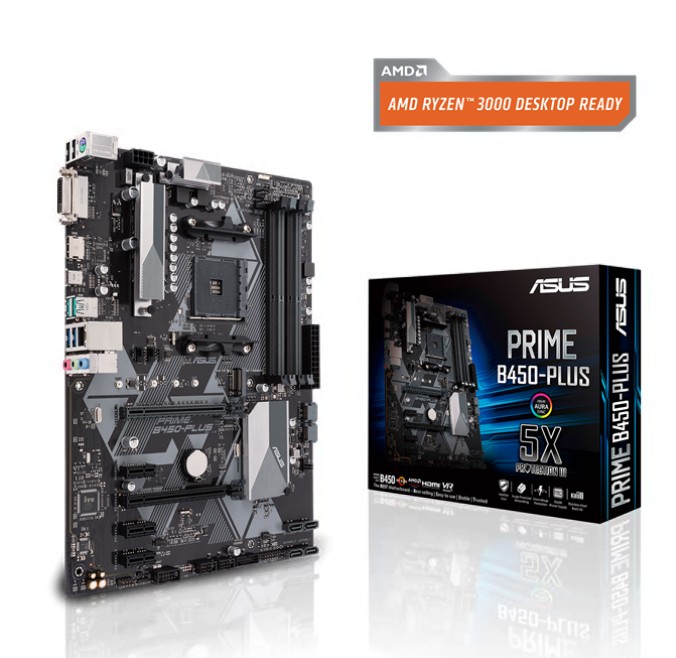
| Motherboard | ASUS PRIME B450-PLUS DDR4 ATX motherboard |
| Memory | 32GB ADATA XPG GAMMIX D10 DDR4 3200MHz RAM |
| Original graphics card | 12GB NVIDIA GeForce RTX 4070 |
| Power supply | be quiet! System Power 9 700W 80 Plus Bronze |
| Primary storage | 500GB SATA III 2.5-inch SSD |
| Secondary storage | 1TB Seagate BarraCuda SATA III hard drive |
| Computer case | GameMax F15M Mesh Mid Tower case |
| Lighting | 30cm white LED strip |
The AMD Ryzen 7 3700X is an eight-core, sixteen-thread AM4 processor, while the ASUS PRIME B450-PLUS is an ATX B450 motherboard supporting DDR4 memory, SATA storage and a PCIe 3.0 x16 graphics-card connection.
The original RTX 4070 uses 8GB of GDDR6 memory and is based on NVIDIA’s Ampere architecture.
The Problems Reported by the Customer
The customer described three main symptoms:
-
Games installed through Steam would freeze during play.
-
The monitor would suddenly lose its display and show a black screen.
-
The computer would occasionally restart without displaying a useful error message.
The PC could still perform basic everyday tasks, which made the problem appear software-related at first. However, the failures became much more frequent when the graphics card was placed under gaming load.
This was an important clue, but we still needed to check the rest of the computer before confirming that the GPU was responsible.
Diagnosing the Gaming Computer
Our engineers began by examining the computer’s overall condition and checking the internal connections. We then tested the components associated with gaming stability, including the memory, storage devices, graphics drivers, power delivery and graphics card.
The operating system and storage remained accessible, and the computer could complete ordinary desktop tasks. The instability appeared primarily when the system was required to produce demanding 3D graphics.
Further testing allowed us to isolate the problem to the NVIDIA GeForce RTX 4070 graphics card. Under gaming load, the faulty GPU was causing the display to cut out and the system to freeze or restart.
Instead of replacing unrelated parts, we explained the findings to the customer and recommended replacing the defective graphics card.
Replacing the Faulty RTX 4070
The damaged RTX 4070 was removed and replaced with an MSI GeForce RTX 5070.
The RTX 5070 is a newer-generation graphics card based on NVIDIA’s Blackwell architecture. MSI’s RTX 5070 models use 12GB of graphics memory, although the exact dimensions, cooling system and clock speeds depend on the particular MSI version installed.
Before completing the installation, we checked the case space, motherboard connection and power requirements. The new card was then fitted securely, connected to the power supply and configured with the correct graphics drivers.
The customer’s files and storage drives did not require formatting or Windows reinstallation as part of the graphics-card replacement.
Testing the Repaired Gaming PC
After installing the MSI RTX 5070, we completed a series of stability checks to make sure the original symptoms had been resolved.
The computer was tested for:
Stable video output
Graphics-card detection
Driver operation
Gaming performance
Steam game stability
Power delivery under load
System temperatures
Unexpected black screens
Freezing or automatic restarts
The gaming PC remained stable during testing. The display no longer blacked out, games stopped freezing and the computer completed demanding tasks without unexpectedly restarting.
Gaming PC Repaired and Returned Within 48 Hours
The full diagnosis, graphics-card replacement and testing process was completed within 48 hours. Once we were satisfied that the computer was stable, it was returned to the customer in Hammersmith, London.
The faulty RTX 4070 had been successfully replaced with an MSI RTX 5070, resolving the customer’s freezing, black-screen and restarting problems while also providing a substantial graphics upgrade.
The customer could return to playing games through Steam without the interruptions that had previously made the computer unusable.
Why Gaming PCs Freeze or Restart During Games
A gaming computer that works normally on the desktop but fails during games may have a problem that only appears under heavier load.
Common causes include:
A failing graphics card
Overheating CPU or GPU
Unstable graphics drivers
Faulty or insufficient power supply
Damaged RAM
Storage errors
Loose power connections
Incorrect BIOS settings
Poor internal airflow
Replacing parts without testing can become expensive and may not solve the problem. A proper diagnosis helps identify the failing component and prevents customers from paying for unnecessary repairs.
Gaming PC Repair in Hammersmith and Across London
Geeks Callout provides professional gaming PC repair in Hammersmith and across London. We diagnose branded, custom-built and upgraded gaming computers experiencing freezing, overheating, black screens, poor frame rates, startup problems and unexpected restarts.
Our gaming PC services include:
Graphics-card fault diagnosis
GPU replacement and upgrades
Gaming PC overheating repair
Power-supply testing and replacement
RAM and storage upgrades
Steam and Windows gaming problems
Custom gaming PC troubleshooting
Cooling and airflow improvements
Motherboard and processor diagnosis
Whether your computer freezes while gaming, loses its display or restarts under load, our engineers can inspect the complete system and identify the underlying fault.
Need gaming PC repair in Hammersmith?
Call Geeks Callout London on 0203 290 5190 to speak directly with an engineer and arrange professional gaming computer support.
Author 's Profile
Aamir.M
Aamir Mehmood is a Senior IT Consultant & Technology Writer with over 15+ years of experience and one of the founders of Geeks Callout, an award-winning London-based IT support company specialising in PC, MacBook, and gaming repairs. He is recognised for delivering reliable, customer-focused IT solutions. Under his leadership, Geeks Callout has won multiple honours, including the 2023 Business Excellence Award and the 2025 SME UK Enterprise Award. Aamir also writes insightful articles to simplify complex technology, making him a trusted voice in London’s IT community.