Gaming PC Freezing During Roblox Fixed for a Young Gamer in Barnes

A gaming PC does not always need to be running the latest high-end titles to show serious problems. Sometimes, even a lighter game such as Roblox can expose an underlying fault, especially if the computer has been poorly built or has a failing storage drive.

This case study is based on a real gaming PC repair carried out by Geeks Callout for a family based in Barnes. The customer’s 15-year-old son was mainly using the computer to play Roblox, but the PC had started freezing, crashing and becoming unreliable.

At first, the family tried to deal with the issue themselves. The young gamer had even created a bootable Windows USB stick, hoping to reinstall or repair Windows. However, when he tried to boot from the USB, the PC became stuck on a purple screen just after the Windows USB bootloader stage.

At that point, his mother contacted Geeks Callout for professional help.

The Problem: Constant Freezing and Crashing

The main complaint was that the gaming PC kept freezing during use. The customer explained that the system was crashing even while playing Roblox, which should not normally be difficult for a desktop gaming computer to handle.

When a PC freezes during gaming, the cause is not always the graphics card. It can be linked to storage failure, Windows corruption, overheating, poor cabling, RAM faults, power supply issues, or a badly configured system.

In this case, the failed attempt to boot from a Windows USB gave us another clue. If the computer cannot properly boot into Windows setup and gets stuck during the process, it often points towards a deeper hardware or storage problem rather than just a simple software fault.

Collection from Barnes and Lab Diagnosis

We arranged collection of the gaming PC from the customer in Barnes, and brought it to our repair lab in Epsom for proper diagnostics.

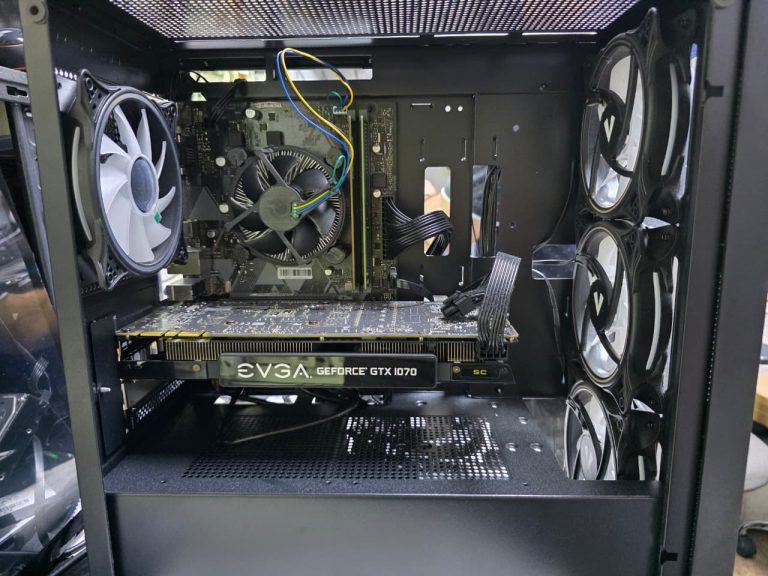
Once the side panels were removed, it became clear that this was not the cleanest build. The PC had been built by a local shop, but the internal work was not tidy. Cable management was poor, and some parts had been installed in a way that made the system look rushed rather than carefully assembled.

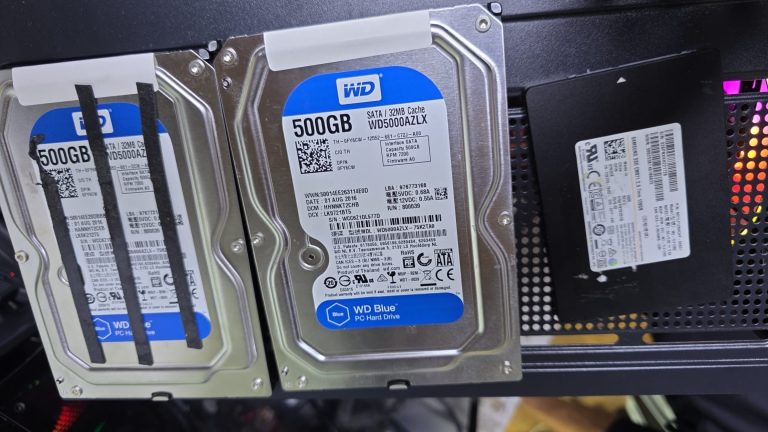
The most concerning part was the storage setup. Two SATA hard drives had been secured using electrical tape rather than being mounted properly in the case. This is not something we like to see inside a desktop PC, especially in a gaming system where airflow, stability and safe mounting are important.

Electrical tape around hard drives may seem like a quick fix, but it is not a proper long-term solution. Drives should be securely fitted using the correct trays, screws, brackets or mounting points. Poorly secured drives can vibrate, move around, affect cable connections and make future servicing more difficult.

What We Found Inside the PC

During inspection, we found several issues with the build quality:

  • messy internal cabling
  • hard drives secured with electrical tape
  • poor storage layout
  • untidy SATA and power connections
  • unnecessary cable clutter around the rear of the case
  • a failing Samsung 128GB SSD

The PC also had an EVGA GeForce GTX 1070 graphics card, which is still capable for many games when paired with a healthy system. The graphics card was not the main issue here. The real problem was the failing system drive.

The Main Fault: Failed Samsung 128GB SSD

After running storage checks, we found that the Samsung 128GB SSD was failing.

The SSD health was showing 73%, with high usage hours and signs that the drive was no longer reliable. A failing SSD can cause exactly the type of symptoms the customer was experiencing:

  • Windows freezing
  • games crashing
  • slow booting
  • random lock-ups
  • failed Windows installation attempts
  • USB installer getting stuck
  • system becoming unstable even during light use

This explained why the PC was crashing during Roblox and why the bootable USB was not completing properly. The computer was trying to work with an unreliable storage drive.

A graphics card or processor problem can cause freezing too, but in this case, the storage diagnosis pointed clearly towards the SSD.

Updating the Customer Before Repair

Before replacing anything, we updated the customer and explained what we had found.

We showed the condition of the build, the electrical-taped hard drives and the failing Samsung SSD. This helped the customer understand that the problem was not simply “Roblox crashing” or “Windows being annoying”. The system drive itself was unreliable and needed replacing.

After discussing the options, the customer approved the repair.

The agreed plan was:

  • replace the failed Samsung SSD
  • install a new Crucial 500GB SSD as the main Windows drive
  • fit a 1TB mechanical SATA hard drive for storage
  • use the larger drive for pictures, music, videos and game files
  • clean up the setup and make the PC boot properly again

This was a sensible option because the SSD would make Windows and games load much faster, while the 1TB hard drive would give the customer plenty of storage space for files.

The Repair: New SSD and Storage Drive Installed

We replaced the failing 128GB Samsung SSD with a Crucial 500GB SSD. This gave the PC a much better main drive for Windows, programs and frequently used games.

We also installed a 1TB SATA mechanical hard drive for general storage. This is useful for:

  • photos
  • music
  • videos
  • school files
  • downloads
  • game files
  • larger folders that do not need to sit on the main SSD

Separating the system drive from storage is a good setup for many gaming PCs. Windows stays fast on the SSD, while larger files can be stored on the secondary drive.

After installing the new drives, we reconfigured the system and tested the boot process properly.

The Result: Faster Booting and No More Freezing

Once the faulty SSD was replaced, the gaming PC started booting normally again. The purple screen issue from the USB boot stage was no longer blocking the process, and the system became much more responsive.

The difference was immediately noticeable.

The PC was:

  • booting properly
  • running faster than before
  • no longer freezing during normal use
  • more stable during gaming
  • fitted with a healthier storage setup
  • ready for Roblox and everyday use again

For the 15-year-old customer, this was the main thing that mattered. His gaming PC was finally usable again, and he could get back to playing without the constant freezing and crashing.

His mother was also pleased because the repair avoided the need to replace the whole computer.

Why This Case Matters

This repair is a good example of why gaming PC problems need proper diagnosis. It is easy to assume that freezing during a game must be caused by the graphics card, but that is not always true.

In this case, the EVGA GTX 1070 was not the main problem. The failing Samsung SSD was causing the instability.

It also shows why build quality matters. A gaming PC is not just a collection of parts. The way those parts are installed, mounted, cooled and connected makes a big difference to long-term reliability.

A poorly built PC can still turn on and run for a while, but over time, loose cabling, badly mounted drives and weak storage can lead to frustrating problems.

Signs Your Gaming PC May Have a Failing SSD

A failing SSD or hard drive can cause many strange symptoms. You may need your storage checked if your PC shows signs such as:

freezing during games

  • Windows taking too long to start
  • games crashing without a clear reason
  • files taking ages to open
  • Windows setup getting stuck
  • blue screen errors
  • slow loading even after restarting
  • system locking up during updates
  • strange behaviour when booting from USB

If your PC is freezing even during light games such as Roblox, Minecraft or Fortnite, it is worth checking the storage drive before assuming the graphics card is faulty.

A Better Setup for the Customer

The final setup made much more sense for this customer.

The Crucial 500GB SSD now handles Windows and the main programs, giving the PC faster startup and smoother everyday performance. The 1TB mechanical SATA drive provides extra space for personal files and larger game folders.

This gives the customer a balanced setup without unnecessary cost.

It was also a good upgrade from the old 128GB SSD, which was small by modern standards and no longer healthy enough to rely on.

Customer Feedback

After the repair, the young customer was very pleased to have the PC working again. His mother was also happy with the result and told us they would come back to Geeks Callout if anything went wrong in future.

That kind of feedback matters to us because this was not just a technical repair. It was a family trying to get a teenager’s gaming PC working again without wasting money on the wrong parts.

Gaming PC Repair in Barnes

At Geeks Callout , we help customers with gaming PC repairs, freezing problems, crashing games, failed SSDs, hard drive upgrades, Windows boot issues, poor PC builds, graphics card concerns and general desktop repairs.

This gaming PC repair from Barnes, involved collection, lab diagnosis, SSD replacement, storage upgrade and system testing. The issue was traced to a failing Samsung SSD, and after fitting a new Crucial 500GB SSD and 1TB storage drive, the PC was running much faster and more reliably.

If your gaming PC keeps freezing, crashing, refusing to boot or getting stuck during Windows installation, it may not need replacing. It may simply need the right diagnosis and a proper repair.

Author 's Profile

Picture of Aamir.M

Aamir.M

Aamir Mehmood is a Senior IT Consultant & Technology Writer with over 15+ years of experience and one of the founders of Geeks Callout, an award-winning London-based IT support company specialising in PC, MacBook, and gaming repairs. He is recognised for delivering reliable, customer-focused IT solutions. Under his leadership, Geeks Callout has won multiple honours, including the 2023 Business Excellence Award and the 2025 SME UK Enterprise Award. Aamir also writes insightful articles to simplify complex technology, making him a trusted voice in London’s IT community.