Dell XPS, Inspiron, or Latitude Turns On But Has No Display? Here is the Fix.

A black screen doesn’t mean a dead laptop. Don’t throw your expensive Dell away, it is almost always worth repairing.

You press the power button on your Dell XPS or Latitude. The keyboard lights up, the fans start spinning, but the screen remains pitch black. Even when you plug in an external monitor, nothing happens.

For professionals and creatives, this is a heart-stopping moment. But before you panic and start shopping for a £2,000 replacement, take a breath. As London’s elite Dell laptop repair specialists, we see this exact issue every week. Most of the time, the problem isn’t a dead screen; it is a microscopic fault on the motherboard that can be flawlessly restored.

Here is exactly what is happening inside your machine and how we fix it.


The Invisible Culprit: The Motherboard Graphics Chip

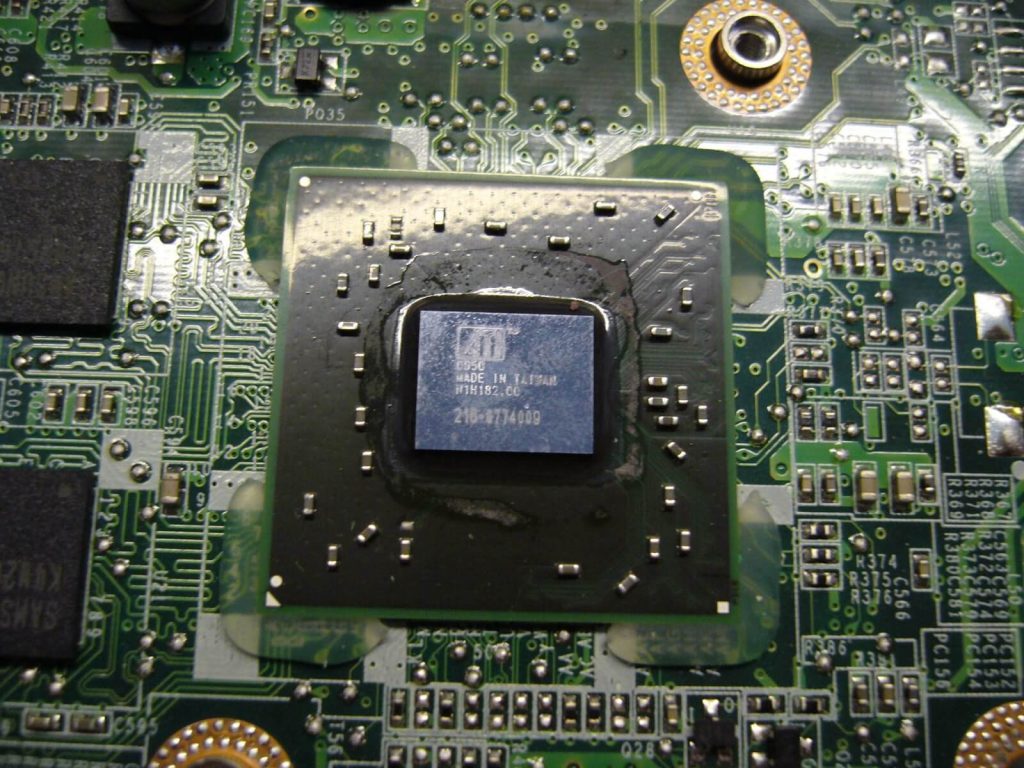
When a Dell computer powers on but fails to send an image to the display, the root cause is frequently a burnt-out or corrupted graphics chip (GPU) on the motherboard.

High-end Dell laptops are designed to run graphics-intensive programs, from heavy video rendering software to AAA gaming. However, because modern laptops are designed to be ultra-thin, their internal cooling systems struggle to keep up with the massive heat generated by the GPU.

Over time, this intense, chronic heat physically degrades the graphics chip. This process is accelerated if you frequently use your laptop on a bed or soft surface, which suffocates the bottom cooling vents, or if London dust has clogged your internal fans.


The Power Delivery Problem: Blown Voltage Converters

During our deep-level diagnostics, we often find a secondary issue alongside the graphics chip: a blown voltage converter.

This tiny motherboard component is responsible for regulating the power flowing to the GPU. When the laptop overheats, this converter can bulge and fail, instantly cutting power to your display. While a big-box retail store will simply tell you the entire motherboard is “dead,” our master technicians use advanced micro-soldering to extract and replace only the blown components, saving you hundreds of pounds.
The Ultimate Fix: Thermal Upgrades & Component Replacement


Getting your Dell back to peak performance requires surgical precision. Here is how our laptop repair London team restores your machine:

  • Precision Micro-Soldering: We safely extract the damaged graphics chip and blown voltage converters, seamlessly soldering brand-new, premium components directly onto your existing motherboard.
  • Upgraded Thermal Conductivity: The factory thermal pads inside most laptops dry out and degrade over time. We apply high-end thermal paste and new, premium cooling pads directly to the graphics chip to guarantee vastly improved heat transfer.
  • Deep System Cleaning: We eradicate years of trapped dust and lint from your cooling fans, ensuring your newly repaired motherboard has maximum airflow.


(Pro Tip: While external laptop cooling trays are great accessories, they will not prevent a motherboard failure if your internal thermal paste has dried out. We highly recommend a professional thermal upgrade every 12 to 18 months.)


Skip the DIY. Trust the Master Technicians.

Modern Dell architecture is incredibly delicate. Attempting a DIY teardown using a YouTube tutorial often results in snapped ribbon cables and a permanently ruined motherboard.

You rely on your machine for your livelihood. Don’t leave its recovery to chance. Whether you need an intricate motherboard repair, an urgent laptop screen replacement, or an overheating fix, our certified technicians bring the laboratory directly to you.

Is your Dell screen completely black? Act quickly before the thermal damage spreads. Call our London experts 24/7 at 0203 290 5190 for an instant diagnostic and same-day repair.

Author 's Profile

Picture of Aamir.M

Aamir.M

Aamir Mehmood is a Senior IT Consultant & Technology Writer with over 15+ years of experience and one of the founders of Geeks Callout, an award-winning London-based IT support company specialising in PC, MacBook, and gaming repairs. He is recognised for delivering reliable, customer-focused IT solutions. Under his leadership, Geeks Callout has won multiple honours, including the 2023 Business Excellence Award and the 2025 SME UK Enterprise Award. Aamir also writes insightful articles to simplify complex technology, making him a trusted voice in London’s IT community.